 QcHelper
The answer exists. It’s on page 43 of a PDF nobody has open.
An industrial project runs on thousands of pages of controlled documents — specifications, drawings, weld procedures, line lists, inspection plans — spread across folders, revisions and disciplines. The information is all there. Getting it out is the job nobody has time for.
Building or inspecting from Rev B when Rev C changed the detail is one of the most expensive routine mistakes on a site.
A hold point that waits on a tolerance or a test pressure multiplies across every crew, every day.
When the person who “knows where everything is” is on days off, the whole team slows down.
Ask your documents.
QcHelper is a Windows desktop application. Point it at a project folder or mapped network share — including exports from SharePoint, Procore or Aconex — and it builds a local index of every document. Then ask questions the way you’d ask a colleague — QcHelper searches the whole set at once and answers with the source documents attached.
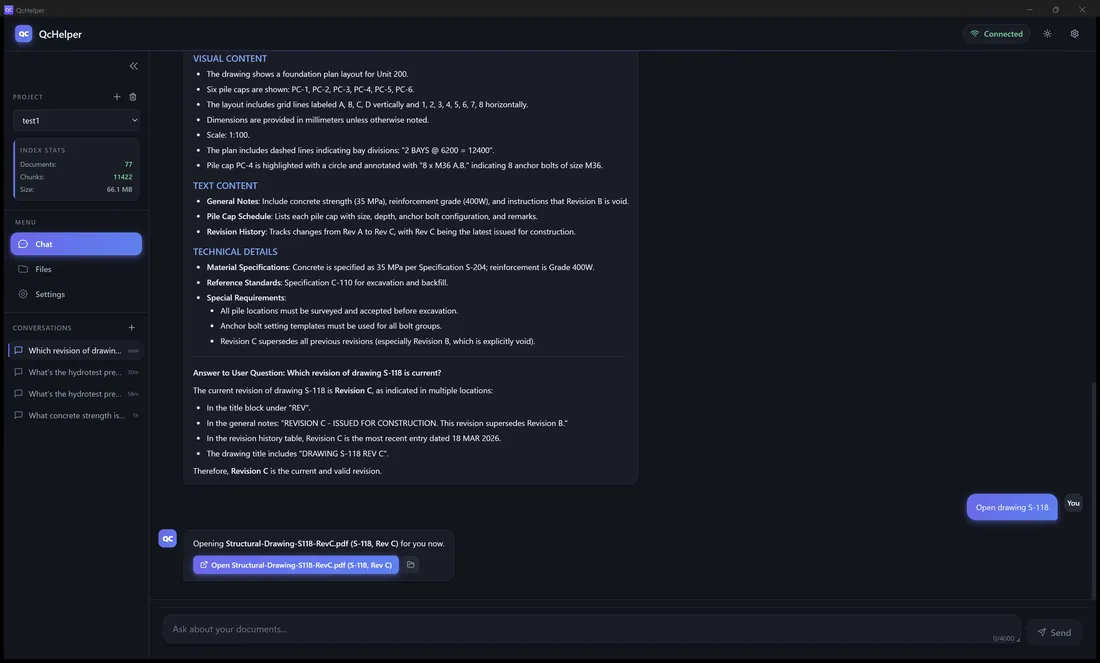
Real app screenshot — the documents shown are a demonstration project.
Built around a QC day — not a generic chatbot.
QcHelper was built hands-on around real quality-control practice — document control, inspections and field questions. It answers the questions your day already asks.
Answers shown are re-creations from the demonstration project.
Built for a field where wrong answers cost money.
01Cited, verifiable answers
Answers list the source files consulted, by name. One click opens the real file. Trust, then verify.
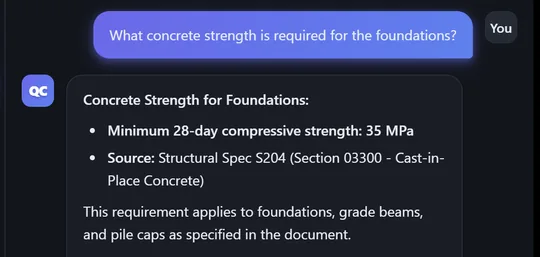
02Built not to invent answers
Ask about something your documents don’t cover, and QcHelper says exactly that — and shows what it reviewed. Tested in a 100-question machine-scored battery (June 2026): 790 of 790 citations pointed to a real document in the index — no fabricated sources found — and 10/10 traps were answered honestly. That checks the sources, not every answer: verify against the cited document. How the 790 citations were checked →
03Revisions in plain sight
Answers list the source files consulted — up to four — so you can open them and check the revision on the title block yourself.
- 1S-118_RevC.pdfDrawings / Structural
- 2S-118_RevB.pdfDrawings / Superseded — lower weight
04Private by design
Parsing and OCR run on your machine, and the search index is stored there. What is sent, and when, is listed below — in full.
Three steps. One workstation to start.
Install QcHelper and point it at your project folder. It parses PDFs, drawings and specs on your machine — including scanned pages via OCR — sending the extracted text over TLS to VincData’s private servers in Canada to build the index, which is stored locally.
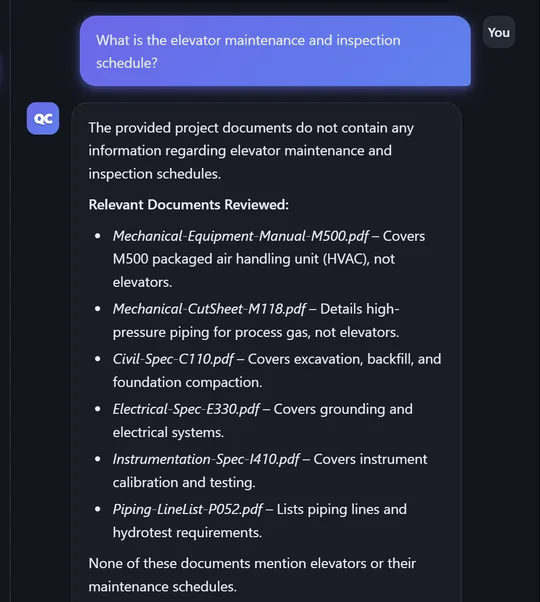
“What concrete strength is required for the foundations?” — plain English, across every document at once.
The answer comes back with the source files it consulted listed. Open the actual document and verify it yourself.
Your document files are not uploaded, with one exception: a photo or image file you ask about is sent so the AI can read it. To build the index, the text extracted from each document is sent to compute search embeddings. To answer, your question, recent conversation and the matching excerpts — labelled with their file names and folder paths within the project — are sent, plus rendered page images for questions about what is on a page. All of it travels over TLS to VincData’s private servers in Canada. No third-party AI providers.
Answers are generated from the matching excerpts of the documents you indexed. Answers list their sources, and QcHelper says so when the answer isn’t in the set (10/10 honesty traps passed; 790 of 790 citations pointed to a real indexed document, no fabricated sources found — internal testing, June 2026). Full method →
An OCR pipeline handles scanned drawings and image-based PDFs during indexing, so older document sets still become searchable.
Full architecture, data-flow table and a straight-answer security checklist: Security & IT overview →
See it answer on your documents.
QcHelper is in an invite-only trial with construction and industrial professionals. Pilot participants get the full product, guided onboarding on their own document sets, and a direct line to the builder.
We set QcHelper up on your own project folder — the demo is your real work, not a canned dataset.
Feedback goes straight to the person writing the code. Pilot users shape the roadmap.
Pilot participation requires a signed agreement covering confidentiality and data handling.
Architecture, data flow and a straight-answer security checklist are published. Send your IT team the Security & IT overview.
About VincData
VincData (Vincdata Technologies Inc.) is an Alberta-based software company building AI tools for construction and industrial workflows. QcHelper was built hands-on around real quality-control practice — document control, inspections and field questions — not adapted from a generic chatbot.